
WordPress security can feel overwhelming.
There are updates to manage, administrator accounts to review, plugins and themes to evaluate, backups to verify, security alerts to monitor, and recovery plans to think about. For many website owners, the hardest part is simply knowing where to begin.
That is exactly why I created the Rooted Dev WordPress Security Quick Check.
It is a free downloadable resource designed to help WordPress site owners quickly review some of the most important security areas on their website and identify where additional attention may be needed.
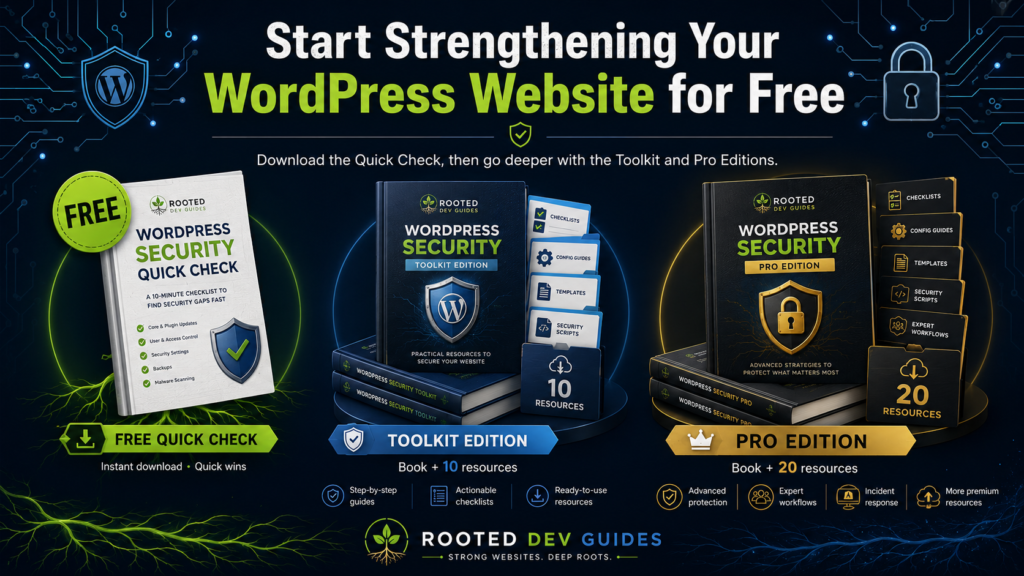
And for readers who want to go beyond the Quick Check, I have also created two larger companion packages for WordPress Security From the Root Up: the Security Toolkit Edition and the Security Pro Edition.
Together, they create a simple path:
Start free. Learn the strategy. Put it into practice. Use it professionally.
Start With the Free WordPress Security Quick Check
The Rooted Dev WordPress Security Quick Check is completely free.
It is designed to give you a fast overview of the security foundation supporting your WordPress website.
Instead of asking whether you have installed the “best” security plugin, the Quick Check encourages you to look at the larger system protecting your website.
That includes areas such as:
HTTPS and SSL
WordPress updates
Plugin and theme updates
Administrator accounts
Passwords and authentication
Backups
Security monitoring
Hosting
Forms and website functionality
Recovery readiness
The Quick Check also includes a simple security score, areas for identifying your highest priorities, and a 7-Day Security Reset to help turn the results into action.
It is not intended to replace a complete professional security audit.
It is intended to help you ask better questions.
Do I know who has administrator access?
Do I know whether my backups can actually restore the website?
Are all of my themes and plugins still maintained?
Would I know what to do if the site were compromised tomorrow?
Those are the types of questions that create stronger security decisions.
Why I Made the Quick Check Free
I believe basic website security knowledge should be accessible.
A small-business owner should not need to purchase an expensive security package before understanding whether obvious weaknesses exist on the website.
The free Quick Check gives you somewhere to start.
If it shows that your foundation is already strong, great.
If it reveals areas that need attention, you now have a clearer idea of what to work on next.
You can also pair the checklist with the free Rooted Security plugin from Rooted Dev Studio:
RootedDevStudio.com/rooted-security
The plugin is another tool that can support your WordPress security strategy, but the same principle applies:
Security should never depend on one plugin alone.
The strongest approach combines responsible development, trusted software, secure hosting, updates, access control, backups, monitoring, and recovery planning.
Want to Go Further? Start With the Book
The foundation behind these resources comes from my first Rooted Dev Guide:
WordPress Security From the Root Up
Building a Layered Defense for Your Website
The book explains why WordPress security should be approached as a layered system rather than a single product or setting.
It explores hosting, users, plugins, themes, updates, secure development, monitoring, backups, recovery, incident response, and long-term maintenance.
The standard eBook is available separately for readers who primarily want to learn and understand the strategy.
But I also wanted to create something for people who said:
“I understand the ideas. Now give me something I can actually use.”
That led to the Toolkit Edition.
WordPress Security From the Root Up — Toolkit Edition
Read It. Use It.
The Security Toolkit Edition combines the complete eBook with 10 practical WordPress security resources designed to help you apply the lessons from the book to an actual website.
The package includes:
WordPress Security Audit Checklist
New WordPress Site Security Checklist
Monthly WordPress Security Maintenance Checklist
Administrator & User Account Audit
Plugin & Theme Security Review
Backup & Recovery Checklist
WordPress Security Layers Reference Sheet
Compromised Website Response Checklist
30-Day WordPress Security Improvement Plan
WordPress Security Scorecard
It also includes a dedicated START HERE guide that explains what each resource is for and how I recommend using the toolkit.
Everything is delivered together in one organized digital package.
Who Is the Toolkit Edition For?
I designed this edition for people such as:
Small-business owners
WordPress website owners
Freelancers
Website administrators
Site managers
Developers
Anyone responsible for maintaining a WordPress website
You do not need to use every worksheet every week.
Different resources are intended for different points in the life of the website.
For example, you might use the Security Audit Checklist when first evaluating a website, the Monthly Security Maintenance Checklist for ongoing care, and the Compromised Website Response Checklist only if something serious happens.
The toolkit gives you those resources before you need them.
Toolkit Edition Price: $12.99
That includes the complete book, START HERE guide, and all 10 companion security resources.
WordPress Security From the Root Up — Pro Edition
Read It. Use It. Use It Professionally.
The Security Pro Edition includes everything from the Toolkit Edition and adds another 10 professional resources intended for developers, freelancers, agencies, consultants, and anyone managing security for clients or multiple websites.
The additional professional resources include:
Client WordPress Security Audit Template
Website Security Handoff Checklist
Security Incident Report Template
Security Maintenance Plan Template
Website Access & Credential Inventory
Backup Restoration Test Record
Plugin Vulnerability Response Worksheet
Pre-Launch Security Review
Quarterly Security Review Template
Security Recommendations Report Template
The Pro Edition also has its own START HERE guide explaining how the complete library fits into a professional workflow.
What Makes the Pro Edition Different?
The Toolkit Edition helps you strengthen and maintain a WordPress website.
The Pro Edition goes another step.
It helps you document the work professionally.
If you manage websites for other people, you need more than a checklist saying something was completed.
You may need to document:
What was reviewed
What risks were found
How serious those risks are
What should be fixed first
Who owns each account
Whether a backup has actually been restored successfully
What happened during a security incident
What needs to happen before a website launches
Which risks a client has chosen to accept
What should be reviewed next quarter
What security recommendations were provided
That is where these professional templates become useful.
They help turn security from a collection of individual tasks into a repeatable process.
Pro Edition Price: $19.99
The package includes the complete eBook, all 10 Toolkit resources, all 10 professional resources, and the dedicated Pro START HERE guide.
That gives you:
The book + 20 companion resources + START HERE guide
in one organized digital package.
Which Option Is Right for You?
The easiest way to think about the three editions is:
READ IT.
Standard eBook
Choose this if you primarily want to learn how layered WordPress security works.
USE IT.
Security Toolkit Edition — $12.99
Choose this if you want the book plus practical worksheets, audits, checklists, recovery tools, and a security scorecard for your own websites.
USE IT PROFESSIONALLY.
Security Pro Edition — $19.99
Choose this if you work with clients, manage multiple websites, perform audits, provide maintenance, or need professional security documentation and reporting.
Security Is a Process, Not a Product
One idea connects every resource I have created around WordPress Security From the Root Up:
There is no single security plugin, setting, or service that can protect every part of a WordPress website.
Plugins can have vulnerabilities.
Themes can have vulnerabilities.
Servers can be misconfigured.
Passwords can be compromised.
Administrator access can be mismanaged.
Backups can fail.
Updates can be ignored.
Security becomes stronger when those risks are addressed through multiple layers.
That is what these resources are designed to help you build.
Not a promise that nothing will ever go wrong.
A stronger foundation.
Better preparation.
Clearer processes.
And a better ability to recover when something does go wrong.
Start Free
If you are not sure where your WordPress website stands today, start with the Rooted Dev WordPress Security Quick Check. Download for Free on the Downloads page!
It costs nothing and gives you a practical starting point.
Then, if you want to understand the strategy more deeply, read WordPress Security From the Root Up.
And when you are ready to put that knowledge into practice, the Toolkit Edition and Pro Edition are there to take you further.
Start with the foundation. Protect it in layers. Keep improving it.
Built from experience. Rooted in better code.
Guides that help you grow!